FOR FACILITY ADMINS
Run your facility smarter.
Whether you manage a clinic, pharmacy, or laboratory, DigCare gives you a complete operational dashboard — from staff shifts to patient bills and insurance claims.
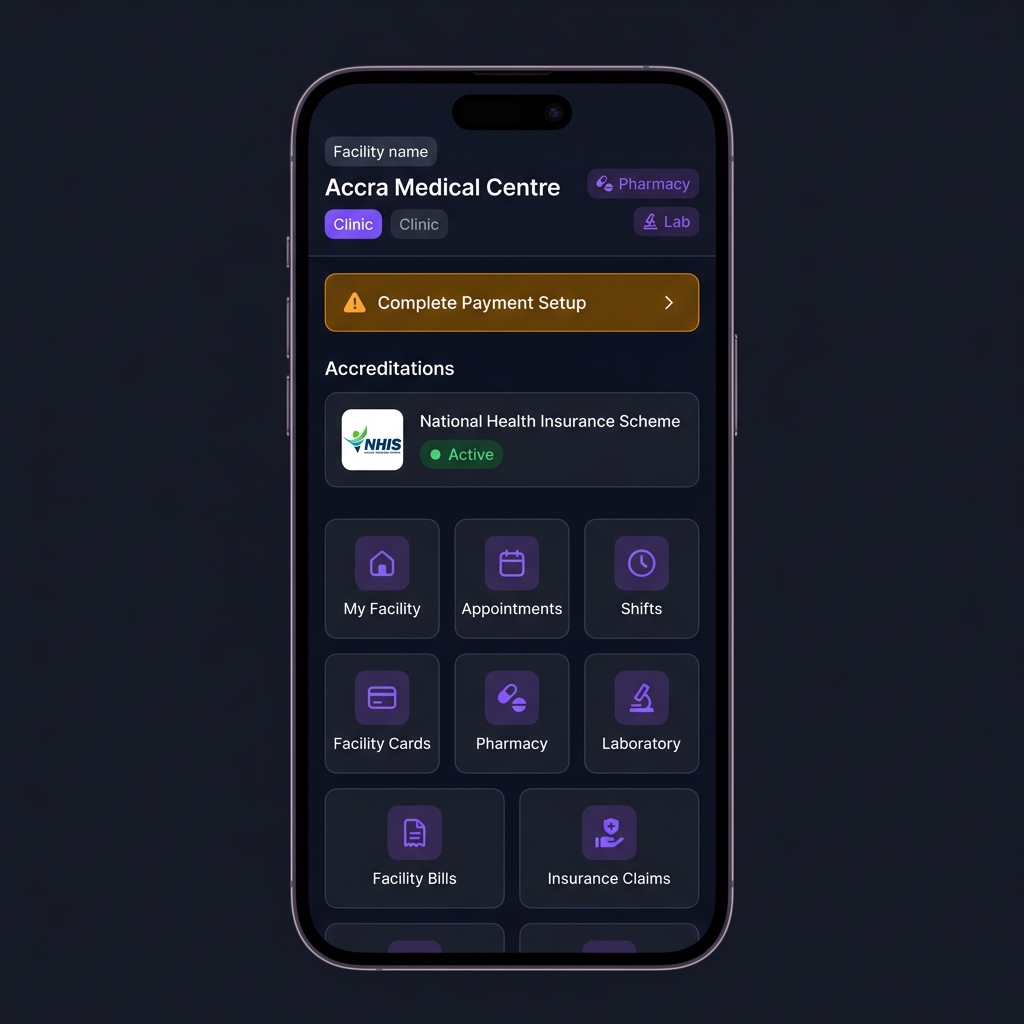
Clinic Admins oversee the day-to-day operations of a medical clinic — appointments, staff shifts, patient bills, insurance claims, and facility health cards. If the facility also offers pharmacy or lab services, those are highlighted as separate badges on the header.
Quick Actions
My Facility
View and edit your clinic's profile — name, address, contact details, type, and services.
Appointments
View all appointments booked at this facility across all doctors. Filter by date, doctor, or status.
Shifts
View and manage the work schedule for all medical professionals at this facility.
Facility Cards
Manage digital health cards — issue, deactivate, or review facility QR cards for doctors.
Pharmacy
Shortcut to pharmacy administration — only visible if pharmacy services are enabled.
Laboratory
Shortcut to lab administration — only visible if laboratory services are enabled.
Facility Bills
View and manage all bills generated for patients across consultations, prescriptions, and labs.
Insurance Claims
View and manage insurance claims submitted through this facility. Requires active accreditation.
Accredited facilities can accept insurance plans from partnered providers. Contact DigCare support to apply for accreditation.
Getting paid through DigCare.
Every facility that charges patients needs a Paystack sub-account. This is a one-time setup that takes minutes — and once complete, patient payments flow directly to your account. Card numbers and Mobile Money PINs are never stored by DigCare.
Accept insurance at your facility.
If your facility is accredited by an insurance provider, patients covered by that provider can use their insurance to pay for services at your facility. DigCare manages the claim submission process automatically.